Digital lash mapping, on the phone in your pocket.
Stamps, maps, color and gradients in one app. Design the full set on a real photo of your client's eyes, with nothing to download and no packs to buy. This is digital lash mapping without the endless shopping list.
Lash artists have been mapping digitally for years, and for just as long the tools have been scattered across paid downloads. A pack of stamps here, a set of maps there, a color overlay from somewhere else, all loaded into a drawing app that was never built for lashes. It works, but it is a lot of buying and a lot of busywork.
Lash Create brings the whole thing into one app made for lashes. Open it, snap a photo, and map the set with stamps, maps, color and gradients that are already there. That is the difference, and it is the reason this is the easier way to map.
Map a full set on a real photo, no downloads
Get Lash Create on the App StoreMap the full set on a real photo.
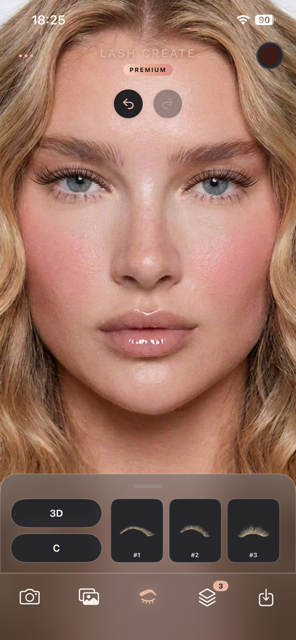
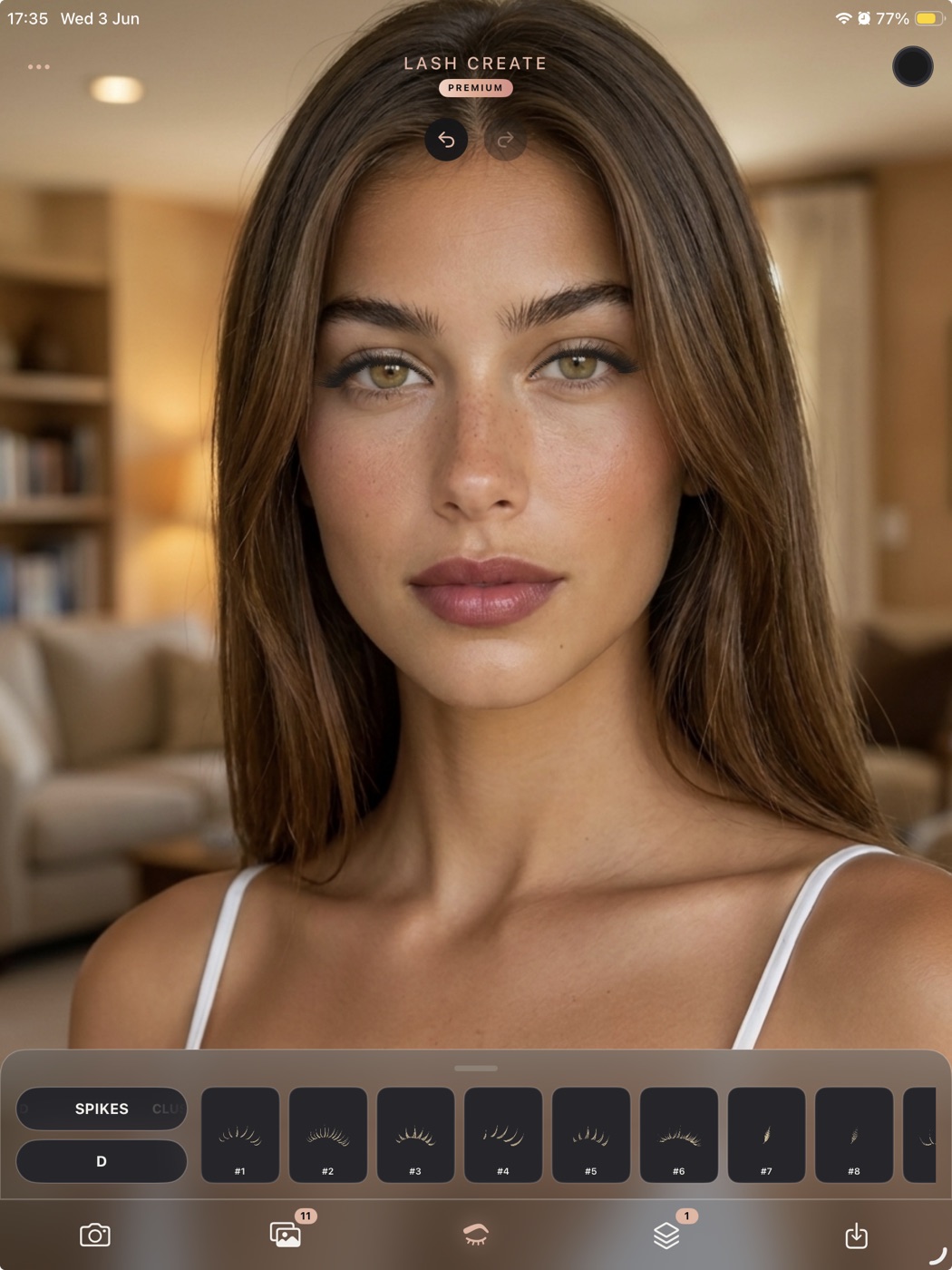
Snap a photo of your client, build the style from hundreds of combinations, then place stamps, color and gradients straight onto her own eyes. The whole map lives in the phone in your pocket, with nothing to download.
Long press, and the map appears.
When the look is right, long press the design and Lash Create draws a personalised lash map for the exact set you built. Premium only, with nothing to import and no packs to load.
What is digital lash mapping?
Digital lash mapping is planning a lash set on a screen instead of on paper. You place lash shapes, lengths and curls onto a photo or a template so you can see the full look before applying a single extension. It is the plan and the preview in one, and it is how the best consultations are run, because the client sees exactly what she is getting. If you are new to the method, start with our guide on how to do lash mapping and the lash mapping chart.
The old way: maps, packs and stamps you keep buying
Search for digital lash maps or digital lash stamps and you land in a sea of downloads. Most shops sell their work in packs, split by style, so a full library means buying again and again. A pack of stamps, a separate set of maps, a color overlay, each a fresh purchase, and each one frozen the moment you download it.
Then there is the device. Procreate and most overlay kits need an iPad and an Apple Pencil before you map a single lash. Add the app, add the packs, add the hours spent assembling each map by hand with layers and masking, and the easy idea of mapping digitally turns into a project. Worst of all, the buying never ends. Every new trend means hunting down and paying for another pack.
One app, everything built in.
Lash Create was made for lashes from the start, so digital lash mapping is the whole point of the app rather than a workaround. Everything you need to design a set is already inside it.
Build the set, then long press to map it
Snap a photo, build your set from hundreds of style and curl combinations, add color and gradients, and place the lash stamps onto each eye. When the look is right, long press the design and Lash Create generates a personalised lash map for the exact style you created. Map generation is a Premium feature, with nothing to import.
Color and gradients in one tap
Add custom color with a full HSB wheel, build gradients with up to five stops, and set any direction. Gradients mirror across both eyes automatically, so the preview reads like the real set. No recoloring layer by layer.
Every design hand drawn by lash artists
Design straight onto the client's own eyes. Every stamp and style is drawn by hand by lash artists, so each reads like a real extension rather than a flat sticker, and the map you generate reflects the exact set you built.
Updated regularly, with no new packs
The stamps and previews are updated over time at no extra cost, so your library keeps growing. A downloaded pack is fixed forever, but the app keeps adding looks. One subscription replaces the endless cycle of buying maps, packs and digital lash stamps.
Saved by name
Every design saves to a private album tagged by client, so you reopen the agreed look at the next fill and keep the result consistent. A folder of downloads gives you none of that.
Digital lash maps without the endless downloads
| What it takes | Downloaded maps & stamps | Lash Create |
|---|---|---|
| Stamps and maps | Bought as packs, often per style | Built in, nothing to download |
| Color and gradients | Separate overlay or manual | One tap, mirrored across both eyes |
| Device you need | iPad and Apple Pencil | The iPhone you already own |
| Drawing app | Procreate or similar, paid | None, it is the app |
| New looks over time | Pack is frozen, buy more | Updated regularly at no extra cost |
| Placement | By hand, layer by layer | Automatic on a real photo |
| Client records | None | Saved and tagged by name |
| Cost to get started | iPad, pencil, app and packs, 400 dollars and up | 9.99 a month or 69.99 a year |
Who digital lash mapping is for
For lash technicians, digital lash mapping turns a quick chat into a shared design. You map the look, agree it with the client, and remove the guesswork before the appointment begins. For clients, it doubles as an eyelash try on, a way to see styles on your own eyes and walk in sure of the set you want. Either way, the preview is what wins the booking and keeps clients coming back. See more on that in our guide to lash consultations and client retention.
Coming from Procreate? Read the full Procreate lash mapping alternative to see exactly what the app replaces.
Frequently asked questions
What is digital lash mapping?
Digital lash mapping is planning a lash set on a screen instead of on paper. You place lash shapes, lengths and curls onto a photo or template to design the full look before applying a single extension. With Lash Create you map straight onto a real photo of the client's eyes, with stamps, maps, color and gradients built in.
What are digital lash maps?
Digital lash maps are the plans that show where each length, curl and style sits along the lash line. Many artists buy them as downloadable packs or Procreate overlays. Lash Create builds the maps for you inside the app, on a real photo, so there is nothing to download and nothing to assemble by hand.
Do I need to buy digital lash map packs?
No. With Lash Create the stamps, maps, color and gradients are all built in, and they are updated regularly at no extra cost. You are not buying a pack, then another pack, then a fresh overlay every time a trend shifts. One app replaces the whole cycle.
Can I do digital lash mapping without Procreate or an iPad?
Yes. Procreate and most overlay kits need an iPad and an Apple Pencil. Lash Create runs on the iPhone in your pocket, and on iPad with the Apple Pencil if you prefer a larger screen. There is no other app to install and no brush kit to load.
Are the lash stamps and maps updated?
Yes. The stamps and previews in Lash Create are updated regularly, so your library keeps growing at no extra cost. A downloaded pack is frozen the day you buy it, but the app keeps adding new looks over time.
Is digital lash mapping good for client consultations?
It is ideal. Mapping the set on a photo of the client's own eyes lets them see and approve the look before you lash, which removes surprises, reduces redos and earns more rebookings. The agreed design saves by name so every fill stays consistent.
Map your next set in seconds.
Download Lash Create and design the look on a real photo, with stamps, maps and color built in.