Procreate lash mapping, and a far easier alternative.
Mapping lashes in Procreate works. It is also the hard way to do it. Here is what the Procreate route really costs in time, money and gear, and how Lash Create gives you the same client preview on the iPhone already in your pocket.
You can map lashes in Procreate, but it needs an iPad, an Apple Pencil, the app and a paid brush kit, and every map is drawn by hand. Lash Create is the easier alternative: the lash brushes, curls and gradients are built in, so you preview a full set on a client's photo on the iPhone already in your pocket.
Walk into any lash community and someone is selling a Procreate brush kit. They look gorgeous, the previews are convincing, and plenty of talented artists swear by them. So this is not a piece about why Procreate is bad. It is a drawing studio loved by illustrators everywhere, and the lash kits built for it can produce lovely maps.
The honest question is a different one. For mapping a lash set with a client, is Procreate the easiest tool, or just the one everyone landed on first? Once you add up the iPad, the pencil, the app, the kit and the hours spent learning it, the answer changes fast.
Map your set on your iPhone, no Procreate needed
Download free on the App StoreThe same map, on your iPhone.
No drawing app, no brush kit, no Apple Pencil. Snap a photo, build the style from hundreds of combinations, and the stamps, color and gradients are already there. Everything Procreate needed a pile of paid packs for is built in.
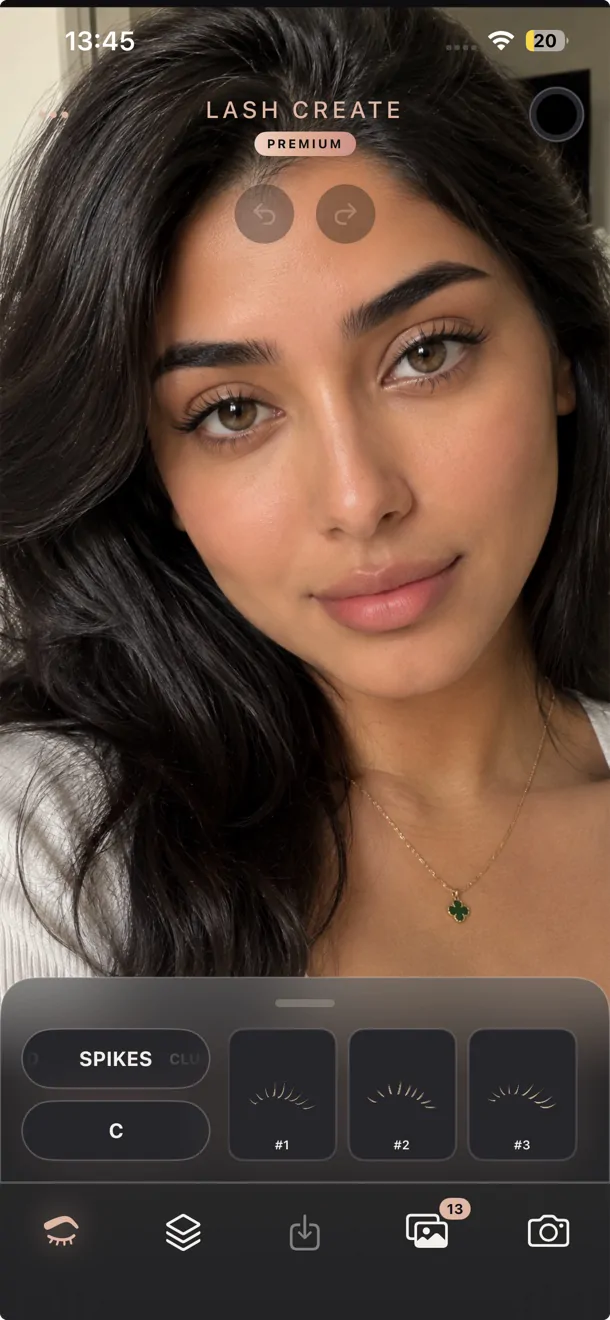
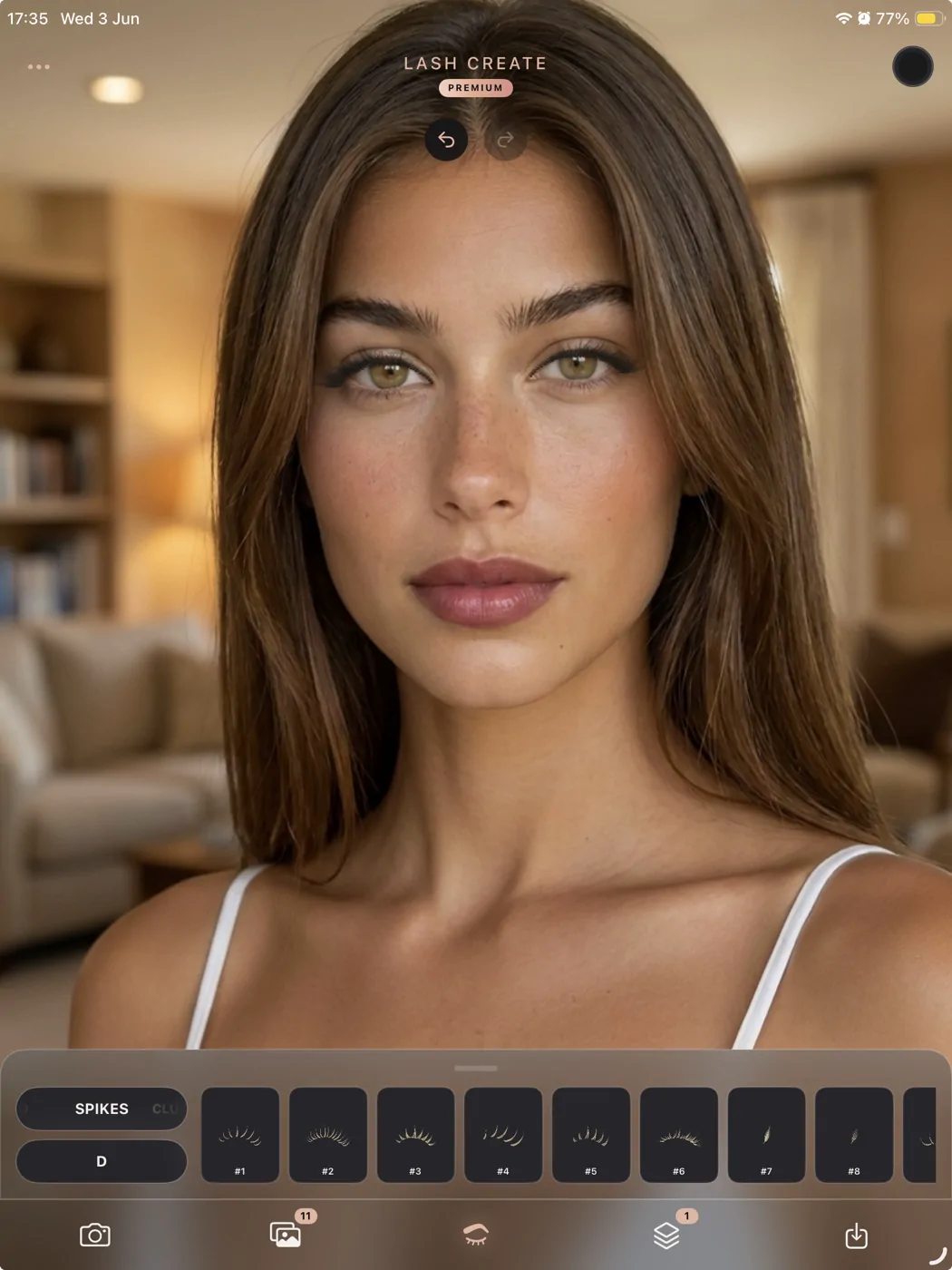
Long press to map, no layers.
Prefer the bigger canvas? Lash Create runs on iPad with the Apple Pencil. Build the set, long press the design, and it draws a personalised lash map for you. No masking, no layer stacks, no hand assembling each map.
What is lash mapping in Procreate?
Lash mapping is the plan for a set. You decide where each length, curl and style sits along the lash line so both eyes match and the look suits the client. Doing this in Procreate means importing a photo or a blank eye template, then drawing the map on top using lash shaped brushes and stamps that you buy as a digital download. If the planning side is new to you, our guide on how to do lash mapping covers the fundamentals before you pick a tool.
It's, in effect, digital art. You work in layers, place each stamp by hand, scale and rotate it, and repeat that across the whole lash line. The result can look great. Getting there is the part nobody mentions in the sales video.
What you actually need to map lashes in Procreate
The kit is only one line on the receipt. To map a single client in Procreate you need all of the following.
An iPad and an Apple Pencil
Procreate runs on iPad, not on a phone. A current iPad with an Apple Pencil sits comfortably north of 400 dollars before you have mapped a single lash. If you don't already own one, that's the real cost of entry.
The Procreate app
Procreate is a separate paid purchase on top of the hardware. It's excellent value for an artist, but it's one more thing to buy, open and learn before lashes enter the picture.
A lash brush or stamp kit
This is where it adds up. A few examples from the shops lash artists actually use:
- One popular kit ships around 20 stamps covering only 2 signature styles across 5 curls, plus a set of practice outlines.
- Another shop sells its maps by collection, so each style family is a separate file at roughly 25 dollars. Build a full library and you are well past 100 dollars.
- A larger bundle offers 110 or more stamps with a training course attached for about 70 dollars, and you still assemble every map by hand.
So the styles you can offer are capped by the packs you have paid for. Want a look the kit doesn't cover? That's another purchase.
Time to learn it
Layers, brushes, masking, transform, opacity. Procreate is deep, and the lash kits sit on top of that depth. Even the sellers describe the workflow as something that takes practice, especially for newer artists. Every map is drawn from scratch, one stamp at a time.
Where Procreate lash mapping falls short
Pull it together and a pattern appears. The Procreate route asks you to buy hardware you might not own, pay for an app, then pay again for style packs, and finally spend real minutes drawing each map by hand with no help from the software. There's no face detection, no automatic placement, and no record of which client wanted which look. The kit is frozen the day you buy it, so new trends mean new downloads.
The kits sell the outcome, a beautiful preview that wins the client. What they hand over is a folder of files. Everything after that is on you.
Everything Procreate needed packs for, built in.
Lash Create was made for one job, mapping and previewing lashes, by people who actually lash. That focus is the whole difference.
iPhone, or iPad with Apple Pencil
People reach for Procreate because the iPad is what they own. Lash Create runs on the iPhone in your pocket, and on iPad with the Apple Pencil if you prefer a larger screen. Either way there's no second app to learn and no brush kit to buy.
Face detection on each eye
Snap a photo or pick one from the library and the face is found for you. Lashes drop onto each eye in the right place, and you fine tune with a pinch, a drag or a rotate. No layers, no masking.
200 plus combinations built in
8 lash styles, Classic, 2D, 3D, 5D, 10D, Spikes, Clusters and Lower, across 6 curl types, I, J, B, C, D and L. More than 200 variations ready to try, and you can layer them into hybrid sets. A bought kit is capped at the styles you paid for.
Gradients and color in one click
A full color wheel is built in. Pick any shade, build a gradient with up to five stops, and set the direction anywhere. The gradient mirrors across both eyes automatically. In Procreate that's manual recoloring, layer by layer.
Saved and tagged by name
Every design saves to a private album, and you can store client images tagged with their names. Pull up who asked for what in seconds. A Procreate folder gives you none of that.
Built on real lash technician knowledge
Every style is drawn by hand with maximum detail so it reads like a real extension rather than a flat sticker, and the whole tool is shaped by how technicians actually consult and map. It's all in one place, no multiple devices and no separate packs.
New styles over time, request your own
New styles arrive at no extra cost, and if there's a look you want that isn't there yet you can ask the team for it. A Procreate pack is frozen the day you buy it, so anything new means another paid download.
Switching from Procreate? A real lash map, no layers.
Procreate lash stamps vs the stamps built into Lash Create
Procreate lash stamps are pre drawn lash shapes you import into Procreate and place by hand, one at a time, to build a map. They are sold as digital downloads, usually grouped into packs by style, and they are the single thing most artists are really paying for when they go the Procreate route. The trouble is the buying never stops. A new trend lands and you're hunting for another pack of stamps, then another set of maps, then a fresh color overlay.
Lash Create takes a different approach. The stamps are already in the app, hand drawn by lash artists. Open it, snap a photo, build your set from hundreds of combinations, add color, and place the lash stamps onto each eye. Long press the design and the app generates a personalised lash map for the exact style you created, a Premium feature with nothing to import. It's the complete lash design tool, with stamps, maps, color and gradients in one, so there's nothing extra to buy.
Better still, the stamps and previews are updated regularly at no extra cost. Where a Procreate pack is frozen the day you download it, your Lash Create library keeps growing. One app replaces the endless cycle of buying new maps, packs and digital lash stamps.
Procreate lash mapping vs Lash Create
| What it takes | Procreate plus a kit | Lash Create |
|---|---|---|
| Device you need | iPad and Apple Pencil | The iPhone you already own |
| Extra app to install | Yes, Procreate (paid) | None, it is the app |
| Style kit to buy | Yes, about 25 to 70 dollars, often per style | No, 200 plus variations included |
| Lash styles available | Only what the pack includes, often 2 to 7 | 8 styles and 6 curls, 200 plus variations |
| New styles over time | Pack is fixed, buy more to expand | Added continuously, request your own |
| Color and gradients | Manual, layer by layer | One click, mirrored across both eyes |
| Face detection | No, place everything by hand | Yes, automatic |
| Client management | None | Photos saved and tagged by name |
| Learning curve | Layers, brushes, masking | Open it and map |
| Time per map | Minutes of drawing | Seconds |
| Cost to get started | iPad, pencil, Procreate and a kit, 400 dollars and up | $9.99 a month on Premium |
| A lash map drawn from your design | Draw by hand | Long press, personalised map |
| Client try on before booking | Artist tool only | Yes, on her own photo |
How the cost really compares
Set the gear aside and just look at the software. A full Procreate map library, bought style by style, runs well over 100 dollars and then sits frozen until you buy more. Even other lash apps are pricey, one popular option lands near 250 dollars a year for six styles.
Lash Create is free to start, and Premium is $9.99 a month for all 8 styles, 6 curls, 200 plus variations, custom color and client storage. For most artists that pays for itself with a single set, and the client preview that closes the booking comes built in.
So which should you use?
If you already own an iPad, love drawing in Procreate, and enjoy building maps by hand, the kits are a fine creative outlet. If you want to map a look in seconds, on a phone, with more styles, instant color, automatic placement and your clients saved by name, Lash Create is the easier and cheaper path to the same result.
Frequently asked questions
Can you do lash mapping without an iPad?
Yes. Procreate needs an iPad and an Apple Pencil, but Lash Create runs on your iPhone. You map the look straight onto a client photo with your finger, so there's no extra hardware to buy. If you do own an iPad, you can use it there too with the Apple Pencil.
Do I need Procreate to map lashes?
No. Procreate is a drawing app that lash artists adapt for mapping with paid brush kits. Lash Create is built for lashes from the start, so the styles, curls and colors are already there and there's nothing else to install.
How much does a Procreate lash mapping kit cost?
Most brush and stamp kits run from about 25 to 70 dollars, and some shops sell each style as a separate file, so a full library climbs past 100 dollars. On top of that you still pay for an iPad, an Apple Pencil and the Procreate app.
What are Procreate lash stamps?
Procreate lash stamps are pre drawn lash shapes you import into Procreate and place by hand to build a map. They are sold as paid digital downloads grouped into packs by style. Lash Create has lash stamps built in, applied with automatic placement, and updated regularly at no extra cost, so there are no packs to buy.
Is there a lash mapping app for iPhone?
There is. Lash Create is a lash mapping app for iPhone. It detects the face automatically, places lashes on each eye, and gives you 8 styles, 6 curls and 200 plus variations with custom color in one app.
How many lash styles does Lash Create include?
Lash Create includes 8 lash styles and 6 curl types, which combine into more than 200 variations, plus a full color wheel with gradients. A typical Procreate kit covers only a handful of fixed styles.
Can a client try a lash look before booking?
She can. A client previews styles on a photo of her own eyes and walks in knowing the set she wants, and you can map that same look again during the consultation. Try on is on the free tier.
Will Lash Create add more lash styles?
New styles are added over time at no extra cost, and you can contact the team to request a specific look. A Procreate pack is fixed once you buy it, so the app keeps growing where a kit can't.
How much does Lash Create cost?
It's free to start, and Premium is $9.99 a month. That covers all 8 styles, 6 curls, 200 plus variations, custom color and client photo storage, with no separate kits to buy.
Map your next set in seconds.
Download Lash Create and design the look on a real photo, no iPad and no Procreate needed.
 Scan to install on your iPhone or iPad