The lash CRM that
remembers every client.
 Scan to install on your iPhone or iPad
The whole client on one record.
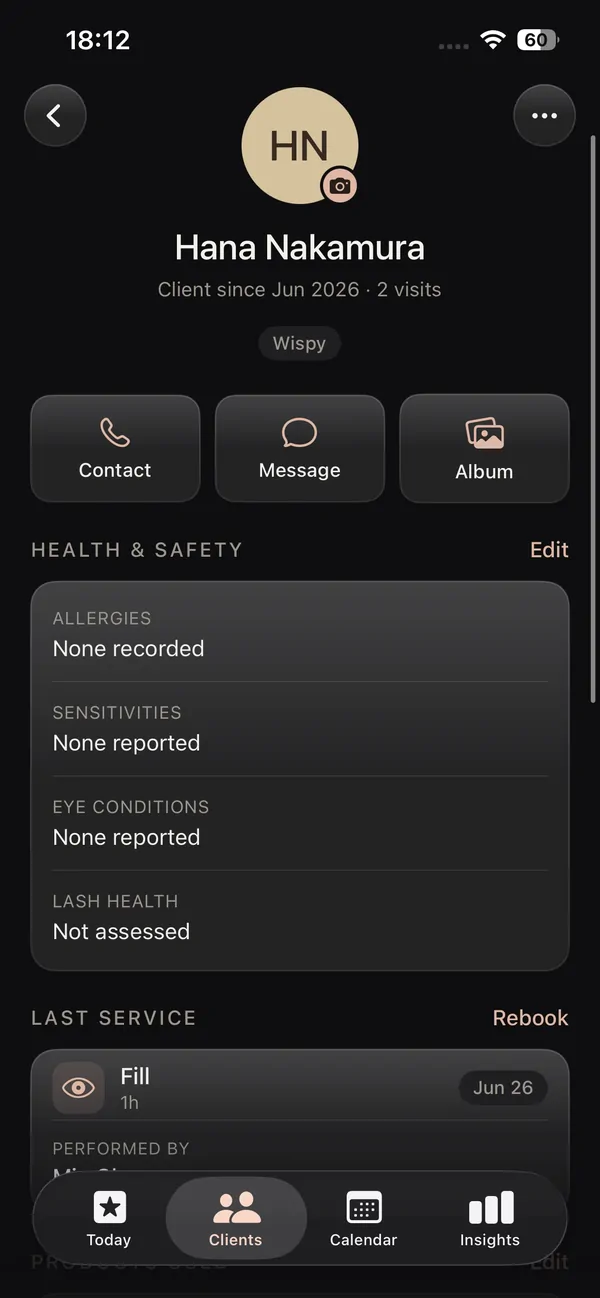
A lash CRM should hold more than a name and a number. Each client record keeps their contact details, their Instagram and WhatsApp, allergies, sensitivities and lash health, plus patch test and consent notes, all in the phone in your pocket. The things that protect your work and your client finally live in the same place as everything else.
Industry data shows salons with a structured client CRM keep 34% more clients over 12 months, and rebook 8 to 12 points more often.
It is a client management app that actually speaks lashes, not a generic contacts list you have to fight.
Your whole book, open at a glance.
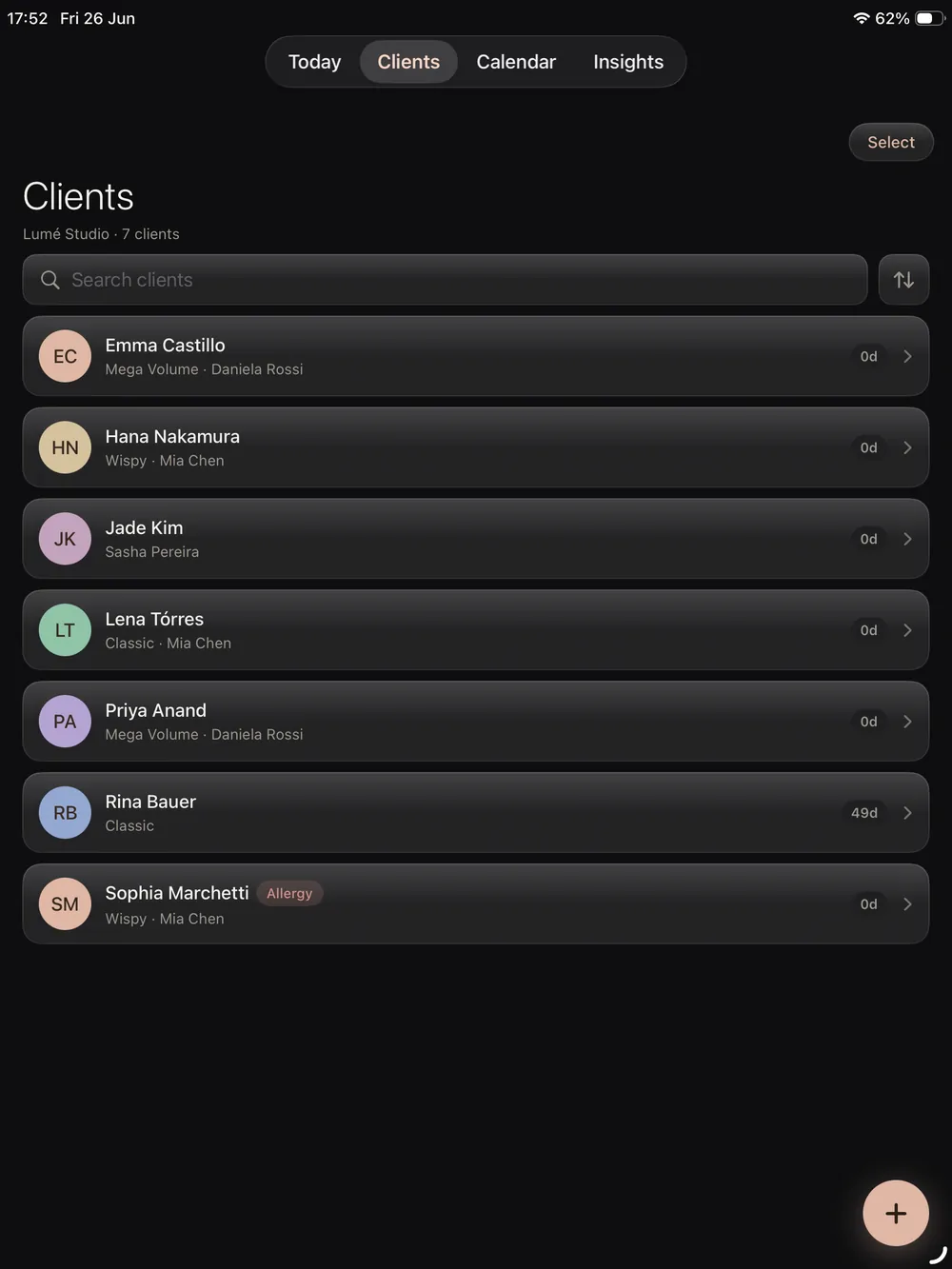
On iPad your client list opens into a real working view. Scan every client with their photos, see who is due, and tap straight into a record during the fill without breaking the consultation. It is the lash CRM for iPad that sits beside you at the bed, not buried in a laptop in the back room.
- Every client with their photos, history and spend
- Open a record mid appointment on the larger screen
- See who is due to rebook without leaving the chair
More bookings. Better retention. Less admin.
The same app books the client, saves the design, takes the payment and follows up, so nothing slips and your calendar stays full.
Booking & calendar
A calendar made for lashes, with pricing per style and reminders on the fill cycle.
Online booking page
Your own booking link, deposits and confirmations handled.
Salon website builder
Pick a designer template, live on your own link with booking built in.
Payments & insights
See what every visit earned and what your busiest styles are.
Reviews & aftercare
Aftercare emailed after every set, reviews you own on your own site.
Lash mapping & design
Map every set on a real photo, layer styles and curls, save to the client.
Every setup in the app, walked through on video, on your own schedule.
A record made for retention.
Everything that keeps a lash client coming back, kept together on one client record.

Visit history
Every past appointment with the design, recipe and result photo attached.
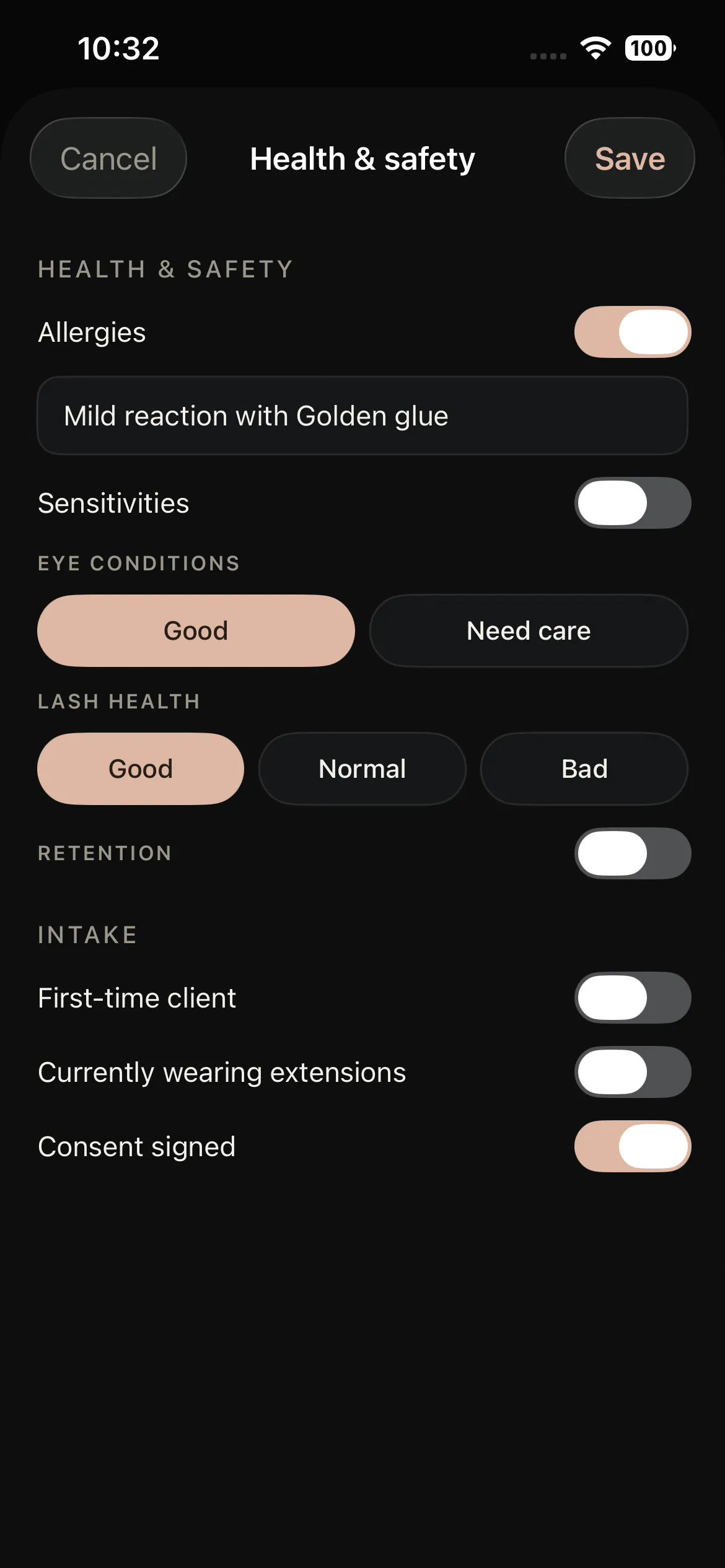
Health & consent
Patch tests, allergies, sensitivities and lash health, all on the record.
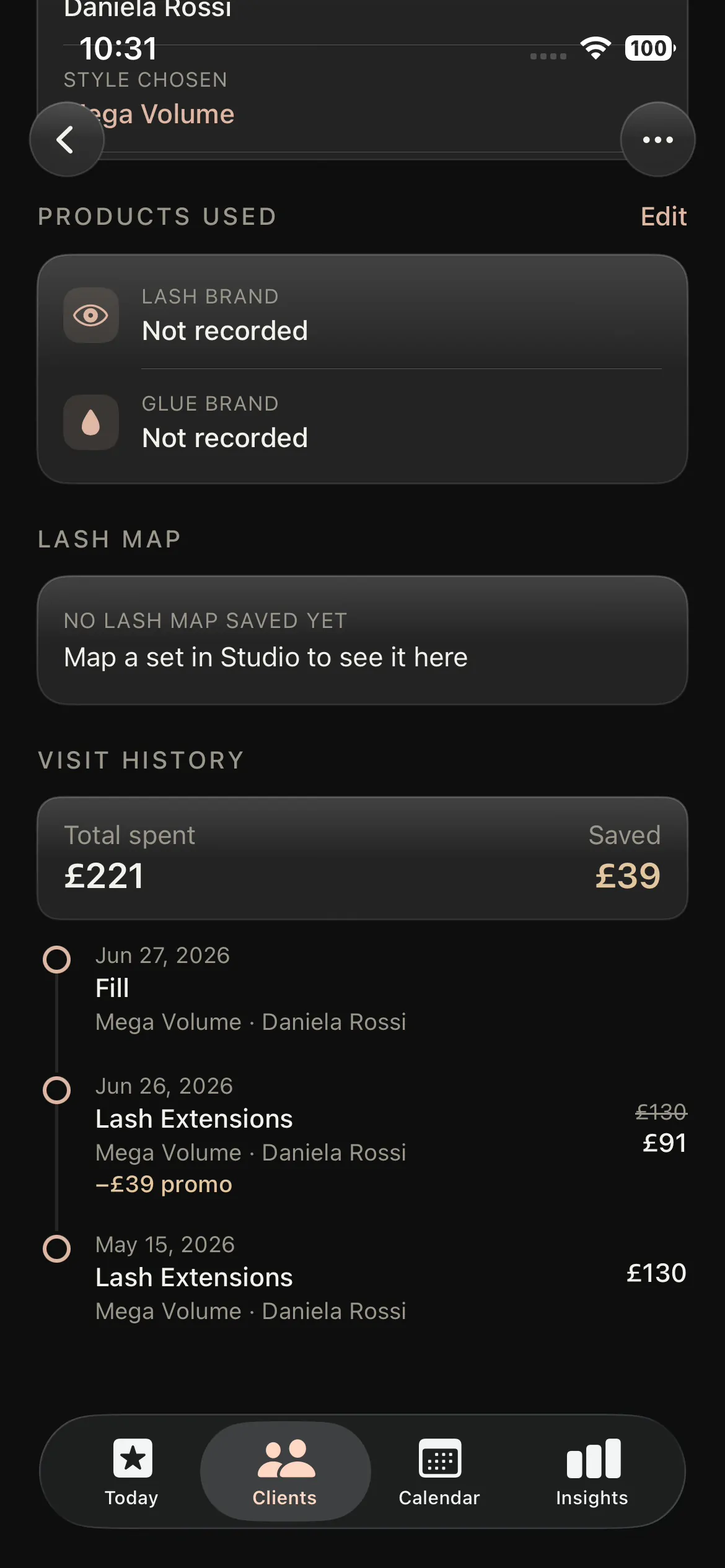
Spend & loyalty
Total spend and visit count, so you know your best clients at a glance.
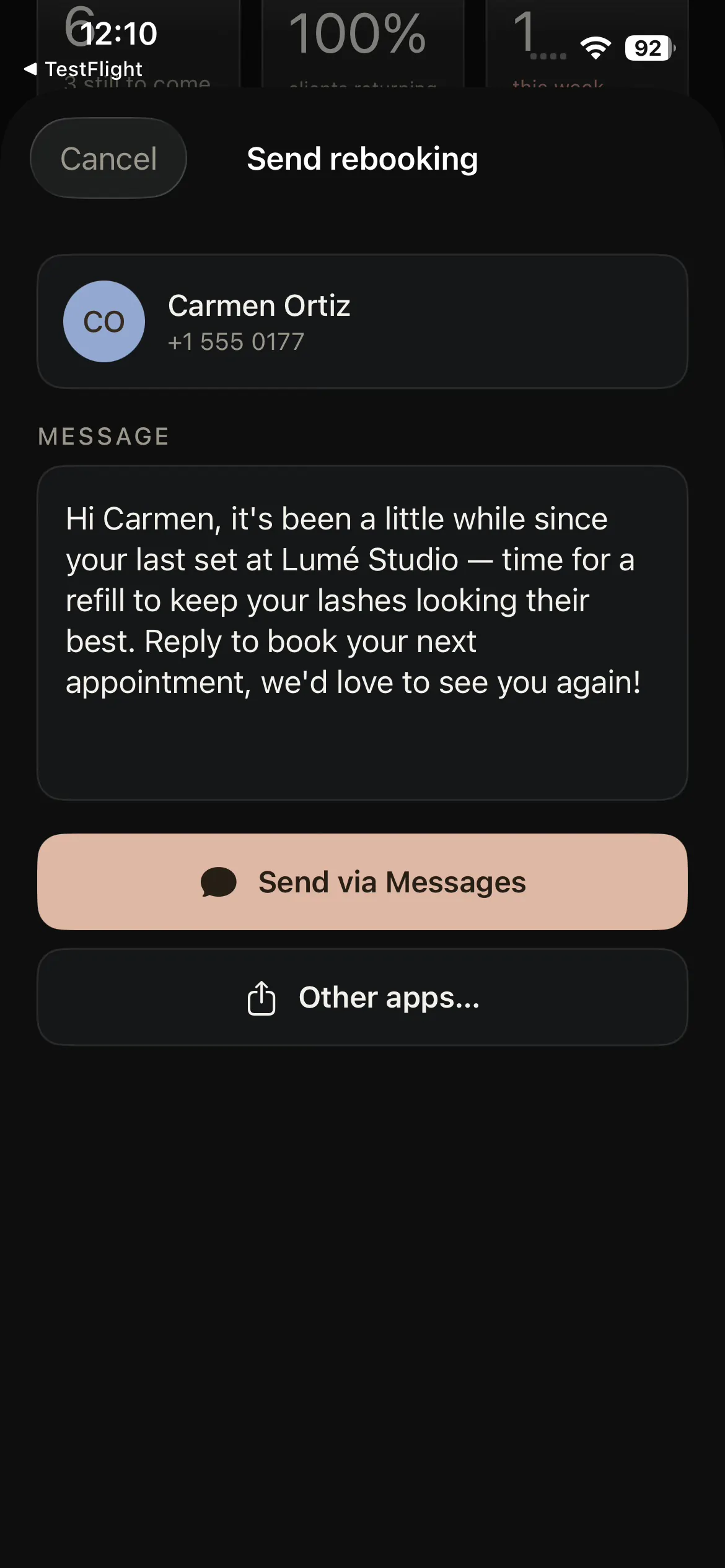
Smart rebook
Reminders that follow the fill cycle and flag clients before they drift.
A retention engine, not a notebook.
Most clients do not leave on purpose. They drift because nobody reminded them. The lash CRM turns that around. Smart rebook reminders follow each client's fill cycle, so the record tells you who is due before the gap gets too long, and a forgotten rebook becomes a booked appointment instead of a lost regular.
Because the design from the mapping app and the result photo both live on this same record, you reopen the exact look at the next fill and keep it consistent visit after visit. Pair it with booking and calendar and the rebook is one tap from the reminder, then the whole consultation and retention loop runs itself.
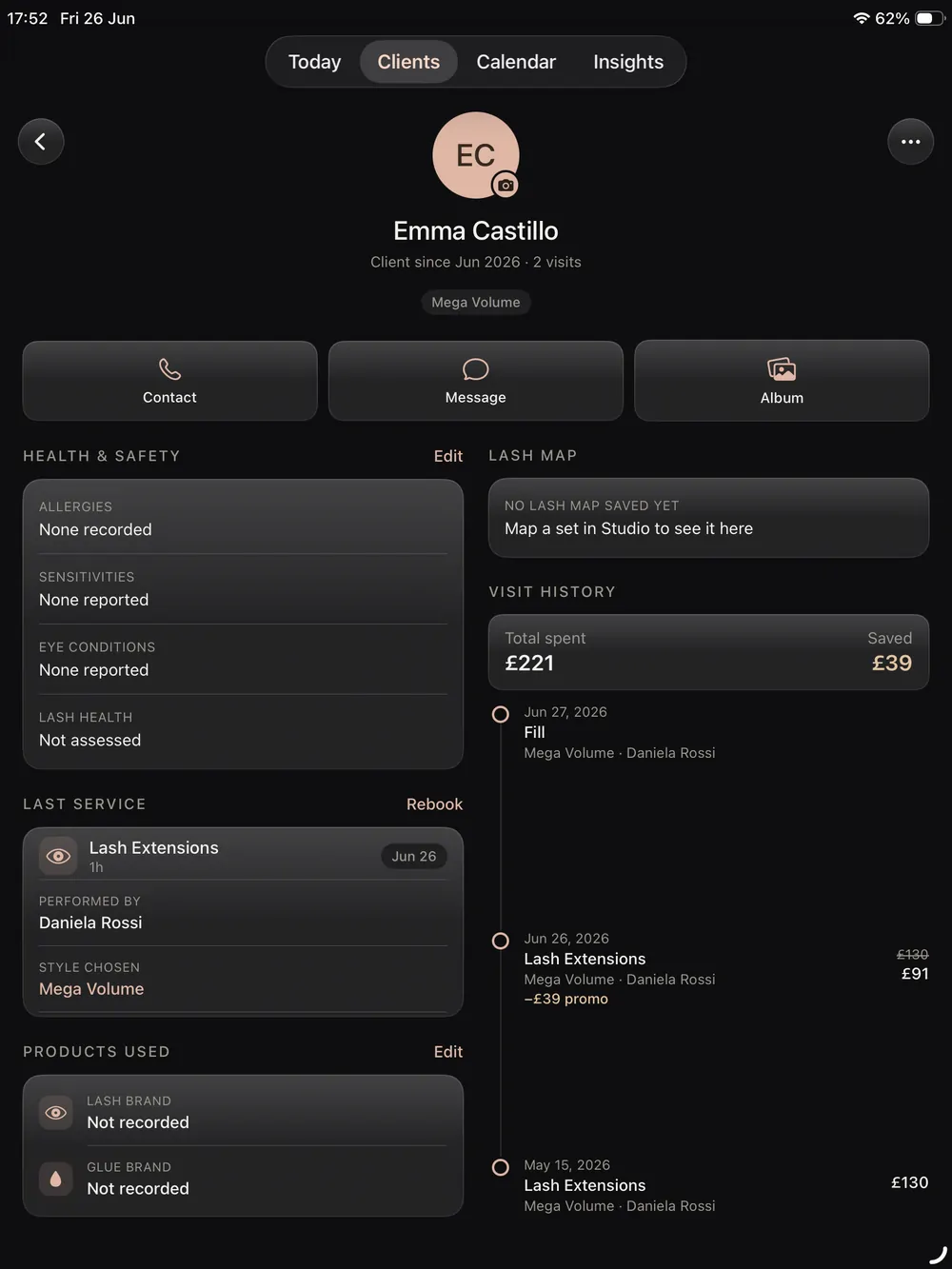
A lash CRM for iPad, iPhone and iOS.
Native and made for the device in your hand, with every client record in sync.
Lash CRM for iPad
The bigger screen is where your book really opens up. The lash CRM for iPad shows every client with their photos and history, and lets you open a record mid fill so the consultation never breaks to go and find the laptop in the back room.
Lash CRM for iPhone
Your whole client book in your pocket. The lash CRM for iPhone keeps every record, photo and rebook date with you, so you can check a client, add a note or confirm a fill from anywhere, and pick it back up on iPad later.
Built natively for iOS
Lash Create is a native iOS app, not a slow web page in a browser. The client records, photos and reminders all run on device, so the lash CRM stays fast and private where broad web platforms feel heavy and generic.
A CRM that speaks lashes, not a generic database
Most salon software treats a lash client like any other contact. It can store a name and a phone number, but it has no idea what a curl, a style layer, a patch test or a fill cycle is, so all the things that actually matter to a lash tech end up scattered across notes apps, camera rolls and direct messages. Lash Create starts from the lash client instead. The record understands the design, the lash health, the result and the rebook date because the whole app was built around lashes, not bent to fit them after the fact.
Why a lash specific CRM beats broad salon software
The big booking platforms cover scheduling and payments, but they keep the design, the client and the rebook in separate worlds, if they hold a design at all. In Lash Create the map, the before and after photo, the spend, the health notes and the rebook date all live on one record, so the look you agreed on is right there at the next visit and the reminder to rebook fires on its own. That single loop, design to booking to record to rebook, is the part broad software cannot copy without rebuilding around lashes. The CRM is part of the Business plan, so it grows out of the same app you already design and book in.
Lash CRM vs the workarounds
| What it takes | Broad salon apps | Spreadsheets & notes | Lash Create |
|---|---|---|---|
| Past designs on the record | Not built for it | Lost in a camera roll | Saved to the client |
| Patch test & lash health | Generic note field | Manual, easily missed | Built into every record |
| Before & after photos | Separate gallery | Scattered in your phone | On the client, by visit |
| Smart rebook reminders | Generic, not fill aware | You have to remember | Follows the fill cycle |
| Spend & loyalty | Sometimes | Manual totals | Tracked automatically |
| Works on iPad & iPhone | Web, often clunky | Whatever app you used | Native on both |
| Built for lashes | No | No | From the ground up |
| Instagram & WhatsApp on the record | No | Manual | On every client |
| Allergies & sensitivities | Generic note | Manual | Dedicated fields |
| Consent signed to the record | Separate add on | Paper drawer | Signed & saved on the client |
Move your clients onto a CRM that remembers
Start 14 day trialCancel anytime. Free to download, and your client list imports in a few clicks.
Everything you need to keep a client.
One app for the record, the design and the rebook behind it, on iPad and iPhone.
A lash CRM for iPad
On the larger screen a lash CRM for iPad can show you the whole book at once. See every client with their photos and history, open a record mid fill, and check who is due to rebook without breaking the consultation. Bringing a list over from Fresha, Booksy, GlossGenius or Vagaro takes a few clicks.
A lash CRM for iPhone
You carry your book everywhere. The lash CRM for iPhone keeps every client record, photo and rebook date in your pocket, so you can add a note, check lash health or message a client from the record itself, then pick it back up on iPad.
Built natively for iOS
Lash Create is a native iOS app made for lashes, so the records, photos and rebook reminders all run fast on device. There is nothing to load in a browser and no generic salon database to bend into a lash shape.
Lash health, patch tests and consent
A real lash client management app protects you. Each record keeps patch test and consent details, allergies, sensitivities and lash health beside the photos and history, so nothing important is sitting in a separate notes app.
Past designs on the client
The lash mapping app saves every design straight onto the client record, next to the before and after photos. You reopen the exact set at the next fill and keep the look consistent, which is the heart of a lash CRM that works.
Smart rebook reminders
Retention is the whole point. Reminders follow the fill cycle and flag clients before they drift, and with booking and calendar attached the rebook is one tap away, so the eyelash CRM turns a forgotten client into a booked appointment.
Frequently asked questions
Is there a CRM built for lash techs?
Yes. Lash Create is a lash CRM made around the way lash techs actually work. The client record understands styles, curls, mapping and fill cycles, so it speaks lashes rather than asking you to bend a generic salon database into shape.
Does the lash CRM work on iPad and iPhone?
It does. The lash CRM runs natively on both iPad and iPhone, and every client record stays in sync, so you can open a client on the larger screen during a fill and pull the same record up on your phone later.
Does it store patch test and lash health notes?
Yes. Each client record keeps patch test and consent details, allergies, sensitivities and lash health notes alongside their photos and history, so the things that protect your work and your client live on the same record as everything else.
Does it remind me to rebook clients?
Yes. Smart rebook reminders follow the fill cycle, so the CRM flags clients who are due before they drift, which turns a forgotten rebook into a booked appointment and keeps your column full.
Does the lash design save to the client record?
Yes. The map you build in the design tool saves straight onto the client record, next to their before and after photos and their rebook date, so the agreed look is right there at the next fill rather than lost in a camera roll.
How much does the lash CRM cost?
You can start free. The CRM sits on the Business plan at $19.99 a month or $129.99 a year, with a 14 day free trial, so you can move your clients across before you commit to anything.