The lash mapping app
for iPad & iPhone.
 Scan to install on your iPhone or iPad
Map the full set on a real photo.
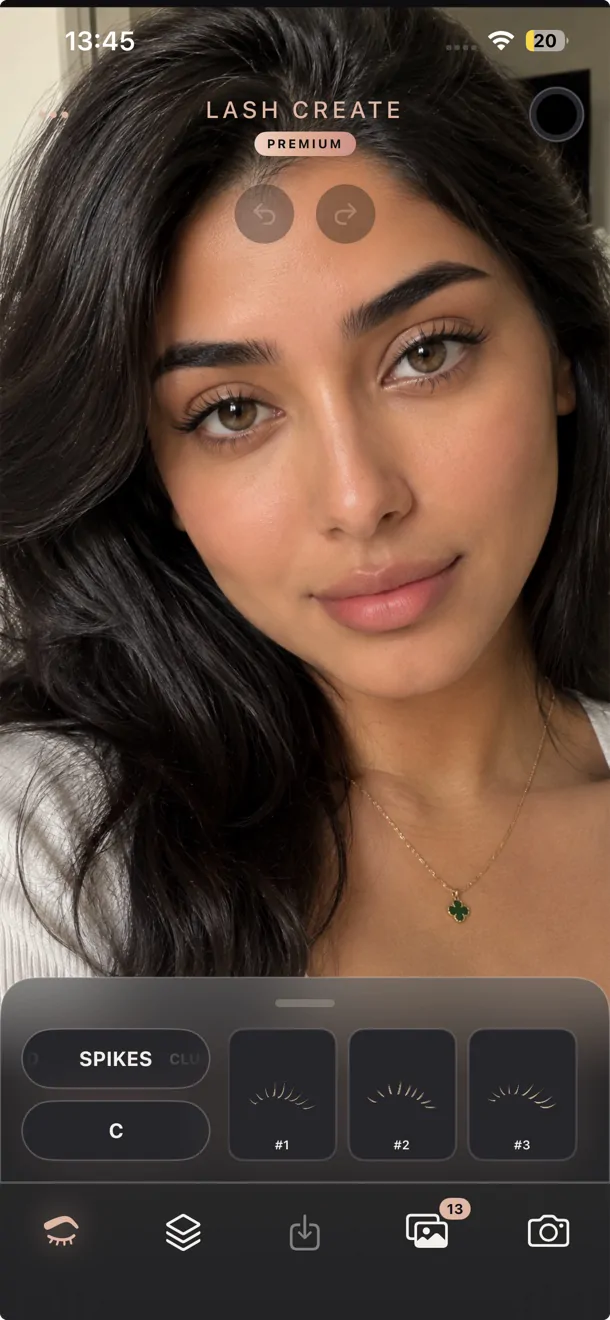
Snap a photo of your client, build the look from 8 styles and 6 curls, then place the lashes straight onto their own eyes. It's a lash design app and a mapping app in one, so the stamps, maps, color and gradients are already built in and the whole thing lives in the phone in your pocket. No Procreate, no packs.
A bigger canvas for every lash map.
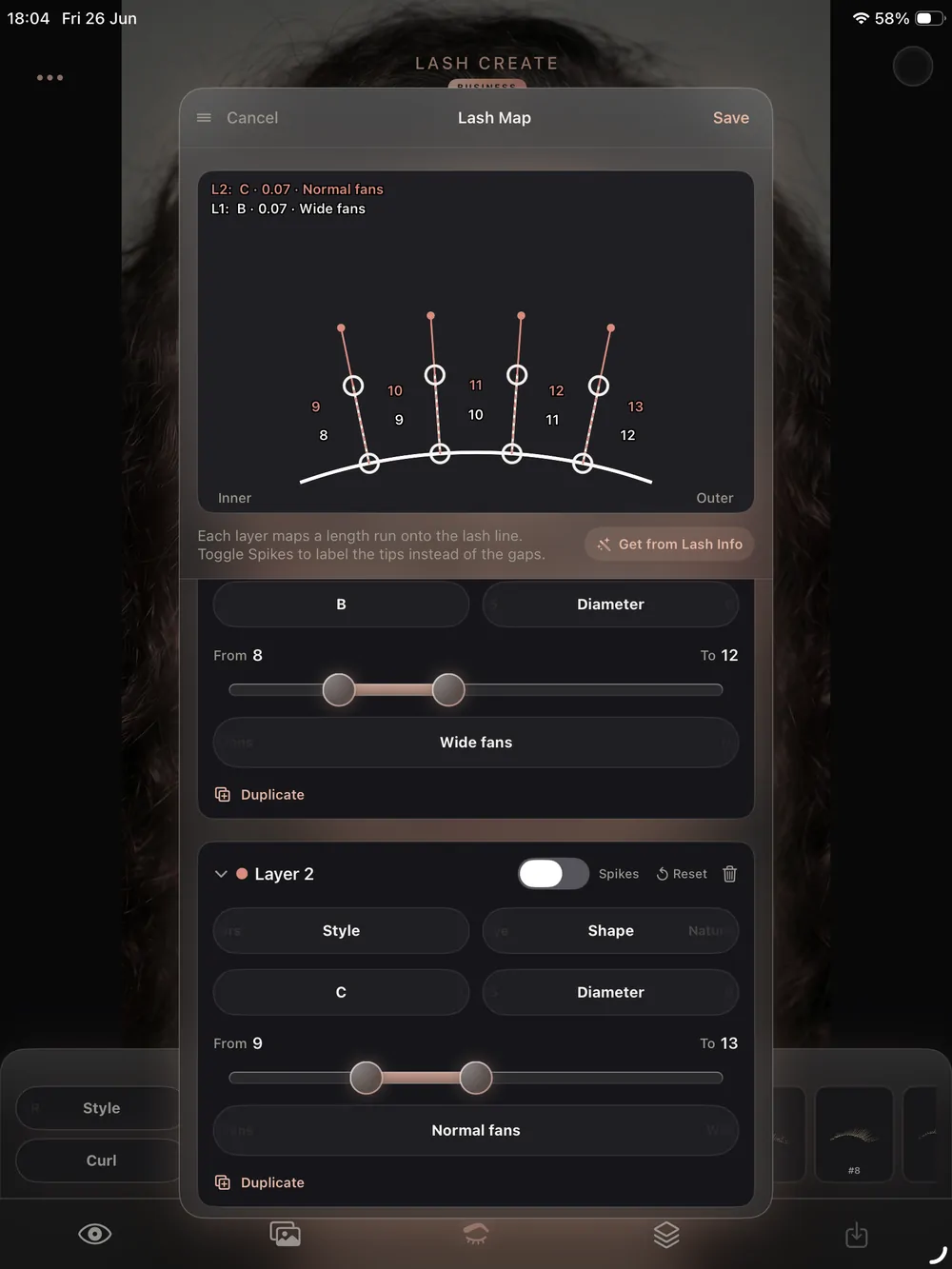
On iPad you get room to see the detail. Place and layer every style on a larger screen, design hands free with the Apple Pencil, and turn a quick consultation into a shared design the client can see on their own eyes. It is the iPad lash mapping app that does the whole consultation, not just the drawing.
- Full screen mapping canvas with Apple Pencil support
- Place, drag, rotate and layer hybrid sets on each eye
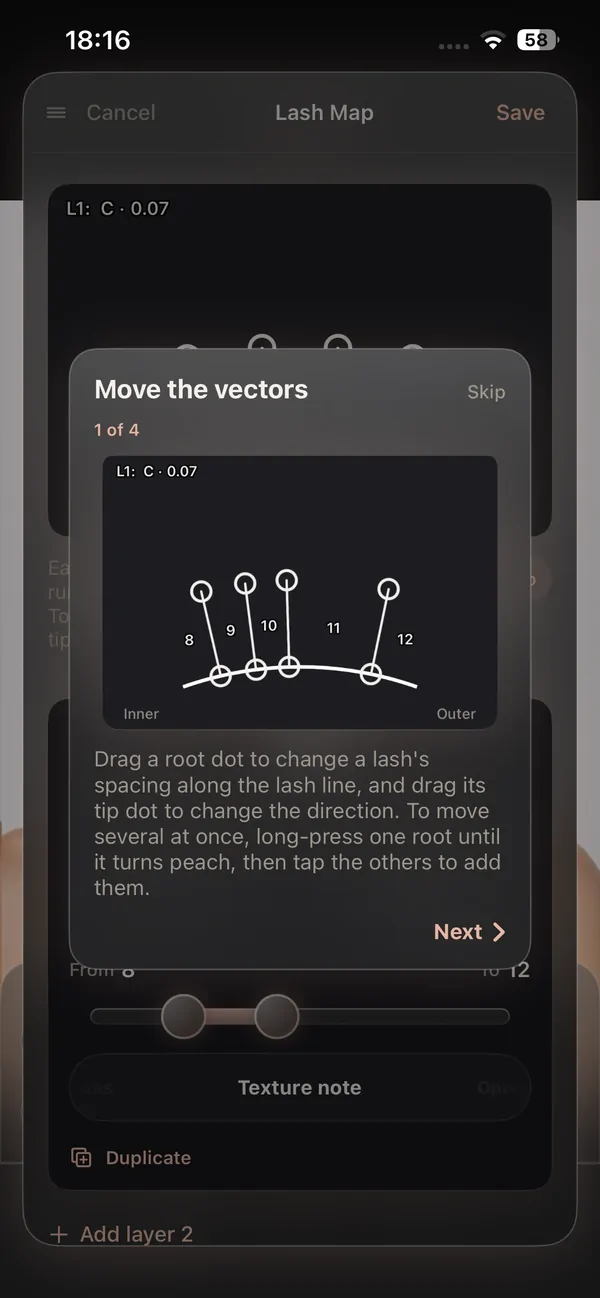
- Long press the design to generate a personalised lash map
More bookings. Better retention. Less admin.
The same app books the client, saves the design, takes the payment and follows up, so nothing slips and your calendar stays full.
Client records (CRM)
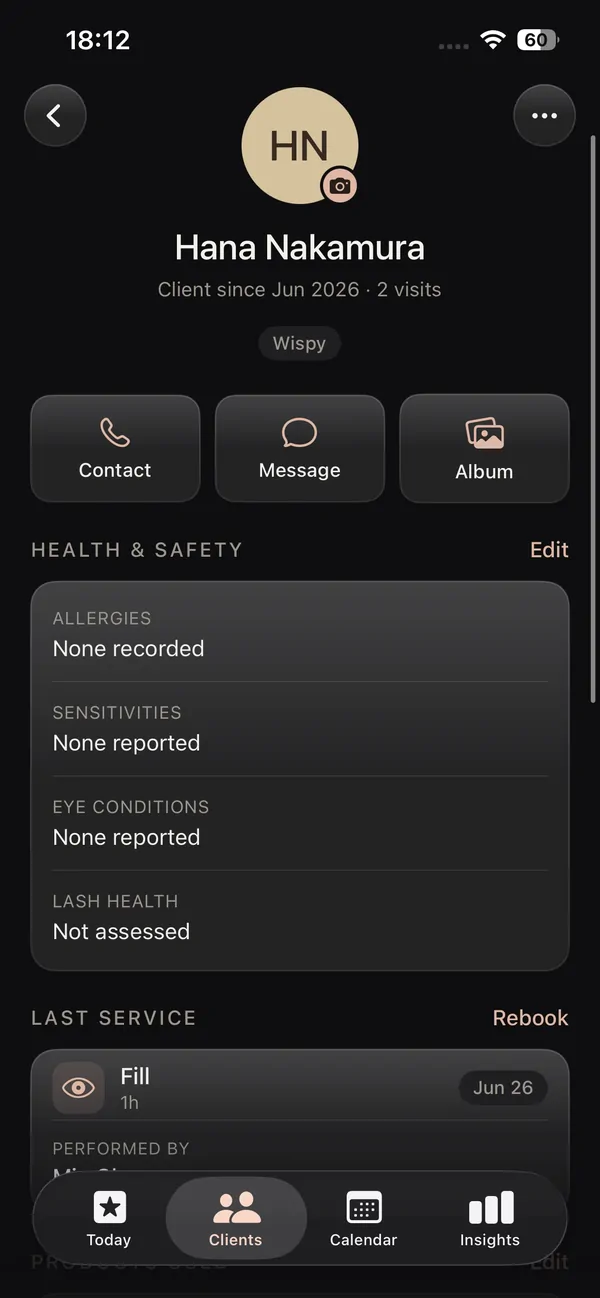
Every client with photos, past designs, health notes and rebook date.
Booking & calendar
A calendar made for lashes, with pricing per style and reminders on the fill cycle.
Online booking page
Your own booking link, deposits and confirmations handled.
Salon website builder
Pick a designer template, live on your own link with booking built in.
Payments & insights
See what every visit earned and what your busiest styles are.
Reviews & aftercare
Aftercare emailed after every set, reviews you own on your own site.
Every setup in the app, walked through on video, on your own schedule.
From a photo to a finished map.
Map the whole look onto a real photo in a few taps, on whichever device is in your hand.
Photograph
Snap your client and their face is detected on each eye automatically.
Map the set
Place styles and curls on each eye, then layer to build the hybrid look.
Color
Recolor any layer with the HSB wheel and mirrored gradients.
Save to the client
The map saves to the client record, ready for the next fill.
8 styles, 6 curls and 250+ variations.
This is where the design half earns its place. Build with 8 styles, Classic, 2D, 3D, 5D, 10D, Spikes, Clusters and Lower, across 6 curls covering I, J, B, C, D and L. They combine into 250+ variations that grow over time, so you can design a soft natural set or a dramatic mega volume look without buying a single pack.
- Full color wheel and mirrored gradients across both eyes
- Multi layer hybrid sets built from real lash art
- Design album and export with no watermark on Premium
Every map saved to the right client.
This is where a mapping app becomes a working tool. The design you agree on does not vanish into a camera roll. It attaches to the client record next to their photos, their history and their rebook date, so you reopen the exact set at the next appointment and keep the look consistent fill after fill.
That link between the map and the client is the part broad drawing apps and generic salon software both miss.
A lash mapping app for iPad, iPhone and iOS.
Native and made for the device in your hand, on the platform lash artists already use.
Lash mapping app for iPad
The big screen is where mapping shines. Lay the full set out with room to see every lash, layer styles with the Apple Pencil, and sit beside your client to design the look together. The iPad lash mapping app turns the consultation into a shared moment.
Lash mapping app for iPhone
Map a whole set from the phone in your pocket, no iPad required to get started. Snap, design and save on iPhone, and because the design lives on the client record you can carry on later on any device.
Built natively for iOS
Lash Create is a native iOS app, not a slow web page in a browser. Face detection, smooth placement and the design canvas all run on device, so the mapping stays fast and precise where broad web platforms feel heavy.
A mapping app, not a drawing app you have to bend
Plenty of artists map digitally in Procreate or a general drawing app, loading brush packs and stamp sets one purchase at a time. It works, but the tool was never made for lashes, so every map is assembled by hand with layers and masking, and the buying never really stops. Lash Create starts from the opposite place. It is a lash mapping app first, so the styles, curls, maps, color and gradients are already inside and drawn by lash artists. You can read the full Procreate lash mapping alternative if that is how you map today, or see how the eyelash try on works on a real photo.
Why a lash specific app beats broad salon software
The big booking platforms cover scheduling and payments, and a general drawing app covers sketching, but neither speaks lashes. They have no concept of a curl, a style layer or a fill cycle, and crucially they cannot fuse the design you create with the client you create it for. In Lash Create the map, the photo, the result and the rebook date all live on one record, so the look you agreed on is right there at the next visit. That single loop, design to booking to record to rebook, is the part broad software cannot copy without rebuilding around lashes.
Lash mapping app vs the workarounds
| What it takes | Procreate & packs | Broad salon apps | Lash Create |
|---|---|---|---|
| Maps on a real photo, face detected on each eye | Manual, by hand | Not built for it | Automatic on each eye |
| Styles, curls & stamps | Bought as packs | None | 8 styles, 6 curls, 250+ variations built in |
| Color & gradients | Manual overlay | None | One tap, mirrored |
| Saved to a client record | No | Separate from any design | Map lives on the client |
| Works on iPad & iPhone | iPad and Pencil only | Web, often clunky | Native on both |
| Built for lashes | No | No | From the ground up |
| Start cost | iPad, pencil, app and packs | Monthly, lash design not included | Free to start |
| Full HSB color wheel | Manual per layer | None | On any layer, mirrored |
| Multi layer hybrid sets | By hand | None | Place, drag, rotate, layer |
| No watermark export | Yes | N/A | Yes on Premium |
| Apple Pencil support | Yes, required | No | Optional on iPad |
| Long press for a personalised lash map | Assemble by hand | None | Auto generated |
| Style library growth | Pack frozen the day you buy | N/A | Updated over time, no extra cost |
Everything you need to map a set.
One app for mapping, design, color and the client record behind it, on iPad and iPhone.
A lash mapping app for iPad
As a lash mapping app for iPad, Lash Create gives you the largest canvas to work on. Place pre drawn styles on each eye, layer them into hybrid sets, and design hands free with the Apple Pencil while your client watches the look come together on their own photo. The Pencil is optional, a finger works just as well.
A lash mapping app for iPhone
You don't need a tablet to start. The lash mapping app for iPhone lets you map a full set from your pocket, then pick the design back up on iPad later because it stays saved to the client record. Free covers the try on and the basic styles on both devices.
Built natively for iOS
Lash Create is a native iOS app made for lashes, so face detection, placement and the mapping canvas all run fast on device, with no upload wait before you place the first lash. There's nothing to load in a browser and no general drawing app to bend into shape.
Digital lash mapping, built in
This is digital lash mapping done properly, with stamps, maps, color and gradients in one place. Build a set, add color, then long press to generate a personalised lash map for the exact style you made, with no packs to buy.
The map saved to the client
A real lash mapping app remembers. Every design attaches to the client record with their photos, history and rebook date, so the agreed look is ready at the next fill rather than lost in a camera roll. On Business the same record holds the booking and the payment too.
Try the look on a real photo
The best way to sell a set is to show it. Use the eyelash try on to put the look on the client's own eyes at the consultation, so they see exactly what they're booking before you start. Recolor any layer, add mirrored gradients, then map the design when you're ready.
The alternative to Procreate
Plenty of artists map in Procreate with bought brushes and stamps, but it was never made for lashes. Lash Create hands you ready styles, curls and color in a tap. See the Procreate lash mapping alternative.
Frequently asked questions
Is there a lash mapping app for iPad?
Yes. Lash Create is a lash mapping app made for iPad. The larger screen gives you room to place, drag and layer every lash style on a real photo, and you can design hands free with the Apple Pencil.
Does the lash mapping app work on iPhone?
It does. Lash Create runs on iPhone as well as iPad, so you can map a full set from the phone in your pocket, then pick the design back up on a larger screen because it stays on the client record.
What makes it a lash mapping app and not just a drawing app?
Lash Create maps the look onto a real photo of the client's own eyes. You place pre drawn lash styles on each eye, layer them to build hybrid sets, and add color, rather than sketching on a blank template.
Do I need to buy stamp or map packs?
No. The styles, curls, maps and gradients are already built in and updated over time, so there are no separate packs to buy and nothing to import before you start.
How many styles and curls are included?
There are 8 lash styles, Classic, 2D, 3D, 5D, 10D, Spikes, Clusters and Lower, and 6 curls covering I, J, B, C, D and L. They combine into 250+ variations that grow over time, with nothing to buy as a pack.
Can I change color and add gradients, like a lash design app?
You can. Lash Create is a lash design app as much as a mapping app: recolor any layer with the full color wheel, add mirrored gradients across both eyes and build multi layer hybrid sets, so colored and ombre looks are as easy as a classic black set.
Does the design save to a client record?
Yes. Every map you build attaches to the client's record alongside their photos, history and rebook date, so the design you agreed on is there at the next fill.
How much does the lash mapping app cost?
Mapping and the try on are free. Premium is $9.99 a month or $69.99 a year for every style, curl and color with no watermark, and the Business plans add client records, booking and payments on top.
Map the next set on their own eyes.
Free forever for the try on and basic styles · Cancel Premium anytime in your Apple settings